

The Reassuring Location-Sharing App That Notices Even When You Can't Speak, vazoom
Launch vazoom before you head out. Even in emergencies where you cannot press the SOS button, it detects phone power-offs and abnormal heart rates, and sends an alert and your real-time location to your registered family members.
The Reassuring Location-Sharing App That Notices Even When You Can't Speak, vazoom
Launch vazoom before you head out. Even in emergencies where you cannot press the SOS button,
it detects phone power-offs and abnormal heart rates,
and sends an alert and your real-time location to your registered family members.
Possible because it’s Vazoom.

Timer Protection Mode
Choose a preset such as “Walk” or “Commute home”, or tap [Custom setup] to set the total duration and check-in interval. It asks if you are safe at those intervals while you are on the move. If you give the wrong response or cannot respond to the safety check, the situation will be judged as an emergency, and an emergency alert with your location will be sent to your guardian. Even if you cannot press SOS manually, Vazoom will automatically request help.

Heart Rate Protection Mode
When a device compatible with Vazoom is connected, the app detects abnormal heart risk signals and asks the user to confirm their safety. If the user gives the wrong response or cannot respond to the safety check, the situation will be judged as an emergency, and an emergency alert with the user’s location will be sent to their guardian. Even in situations where it is difficult to ask for help verbally, Vazoom can deliver body signal information to family members.

Safe Zone Alert
Set safe locations such as home, school, academy, accommodation, or hotel. When the user leaves the designated area, an alert will be sent to their guardian. This is not a continuous location-tracking feature, but a function that allows family members to know immediately when the user leaves a preset safe area. *This feature is currently under development.

Safety Map
Check nearby safety resources on the map, such as shops, AEDs, CCTV, fire stations, and police stations. It is not simply a map showing your location, but a safety map that also shows places where you can receive help in an emergency. This feature is available in Korea only.
How to use Vazoom
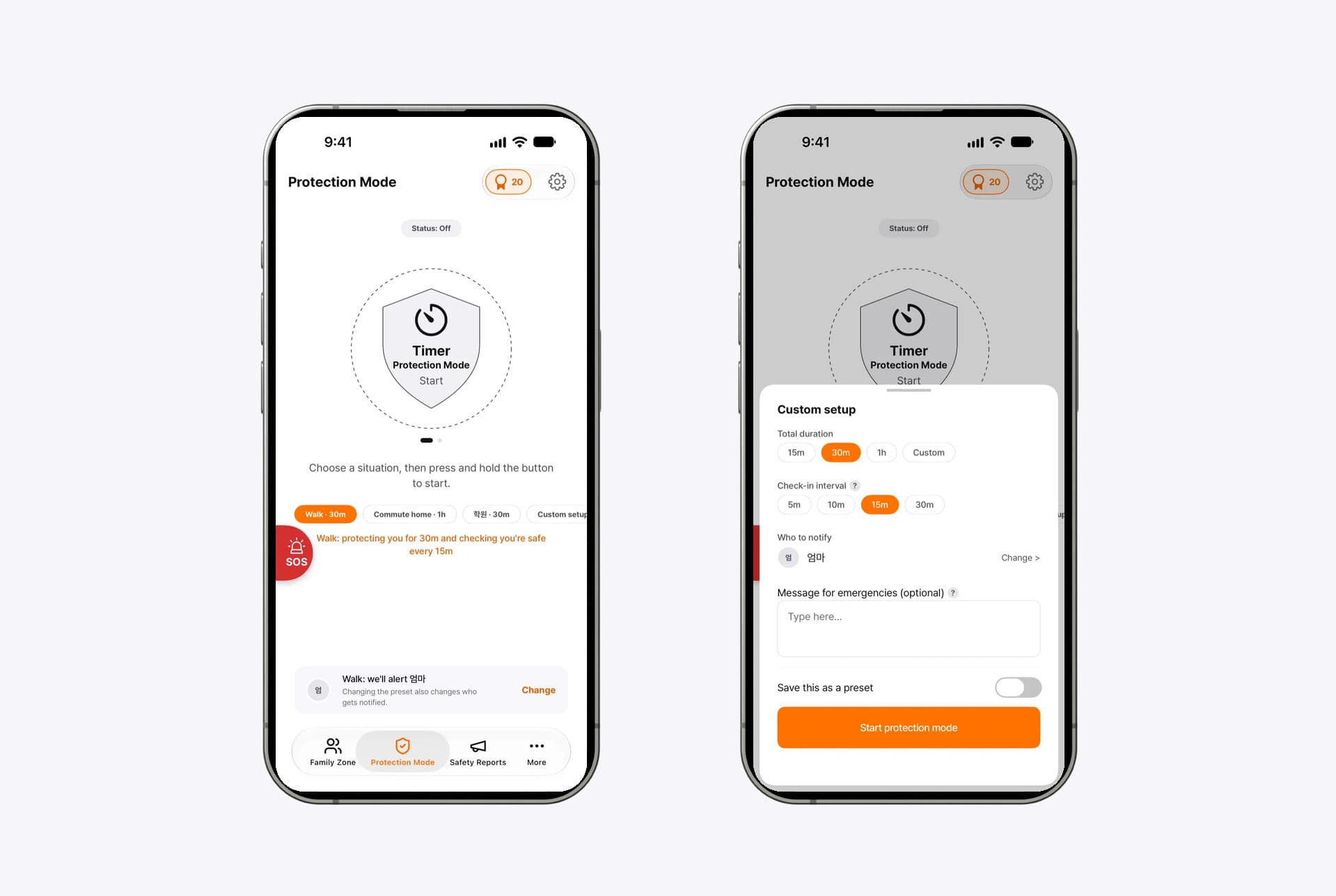
Before departure / Late-night return: Timer Mode
Choose a preset such as “Walk” or “Commute home”, or tap [Custom setup], then press and hold the round button in the middle to start.In [Custom setup] you can set the total duration, check-in interval, who to notify, and a message for emergencies.
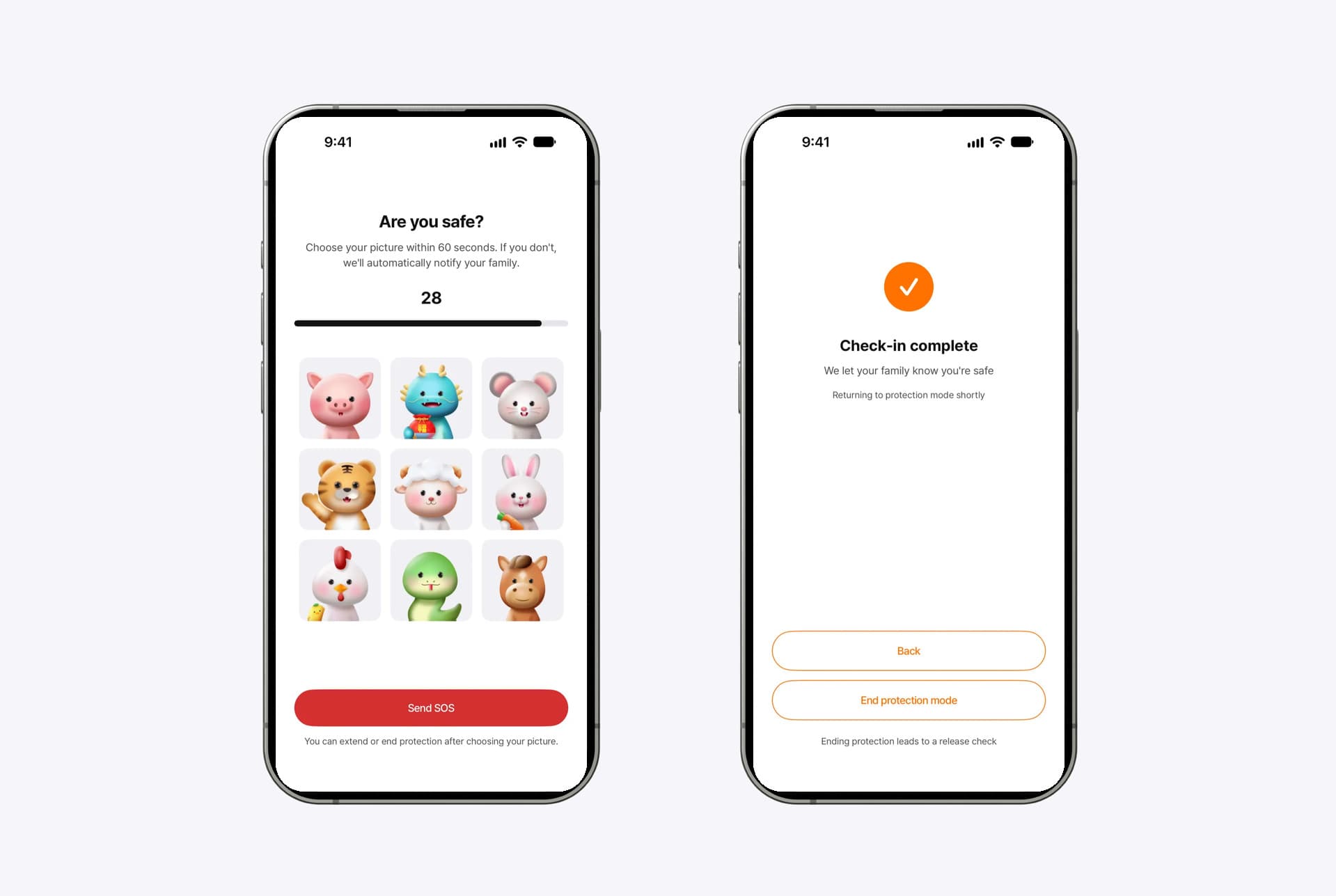
While on the move
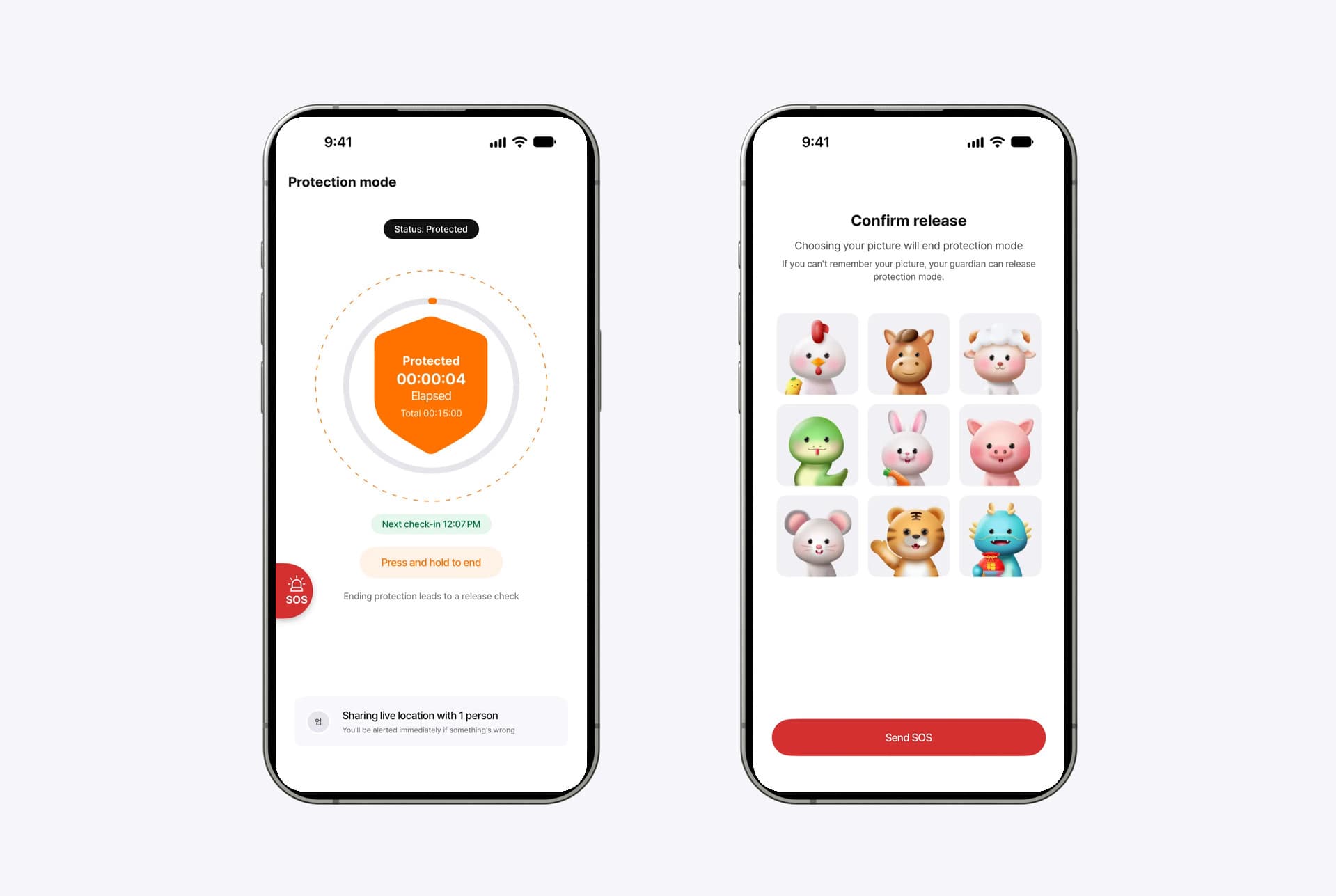
When it is time to check in, tap your picture on “Are you safe?” within 60 seconds.The app’s risk detection system and nearby users will watch over you for the rest.If Vazoom determines that you may be exposed to danger, it automatically sends an alert to your guardian and nearby users.Nearby users who receive the alert can come directly to the scene or report it to 112 or 119.Once the danger has passed, the chat ends automatically and personal information is not exposed.
After arrival
When you arrive at your destination or feel safe, press and hold [Press and hold to end], then tap your picture on “Confirm release”.
How Vazoom works
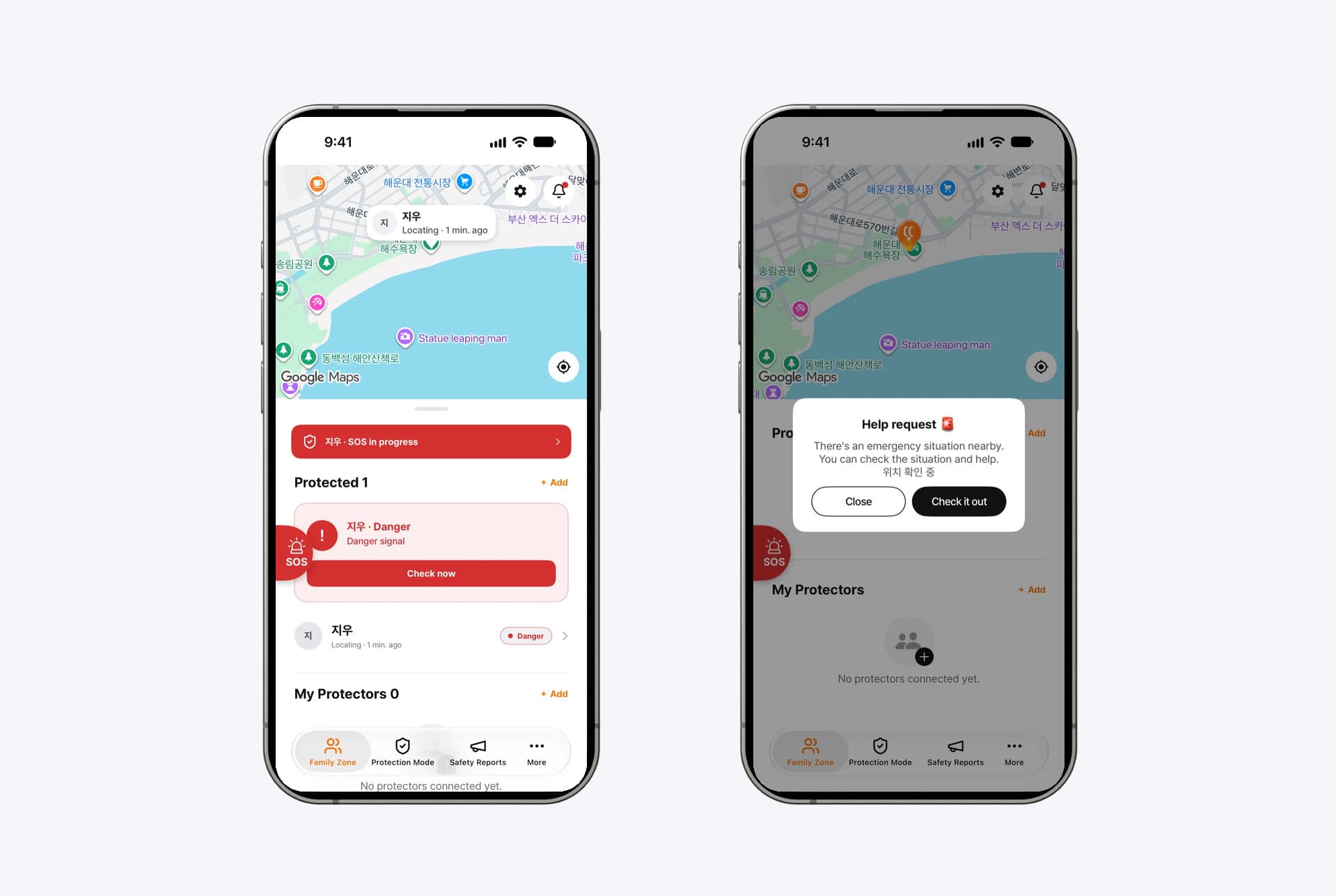
Step 1: Risk detection / Alert
When the user is determined to be in danger, alerts are automatically sent to guardians and nearby users.
User status
Sudden spike in heart rate, heart rate dropping below 60, or loss of heart rate signalThe check-in time runs out, or the wrong picture is chosen
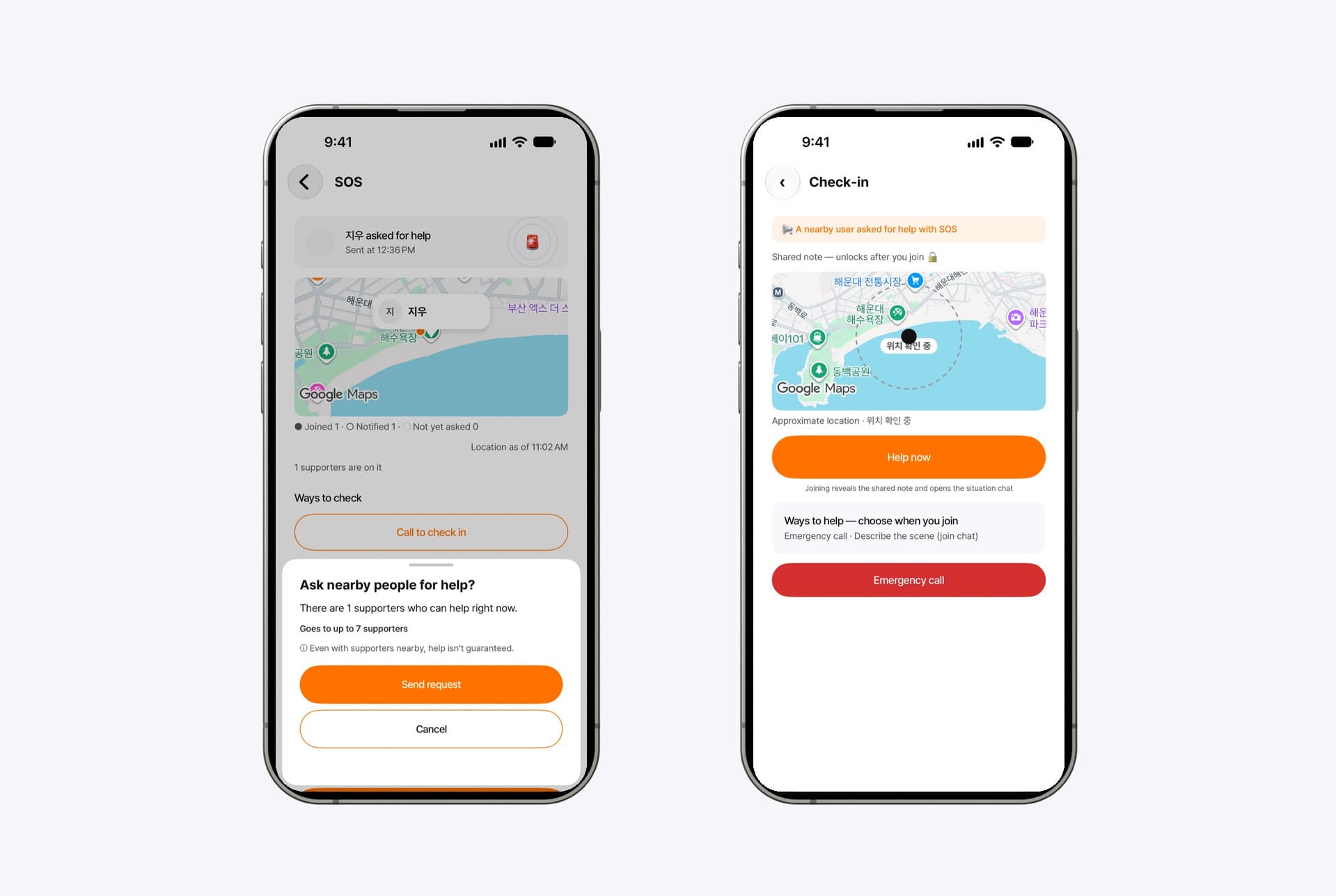
Step 2: Giving help
Users who accept a help request can see the location of the person in need and choose how to help.
When a guardian requests help from nearby users
Alerts are sent to up to 7 verified Vazoom neighbors nearby.
A chat room is created with the participants and the guardian.
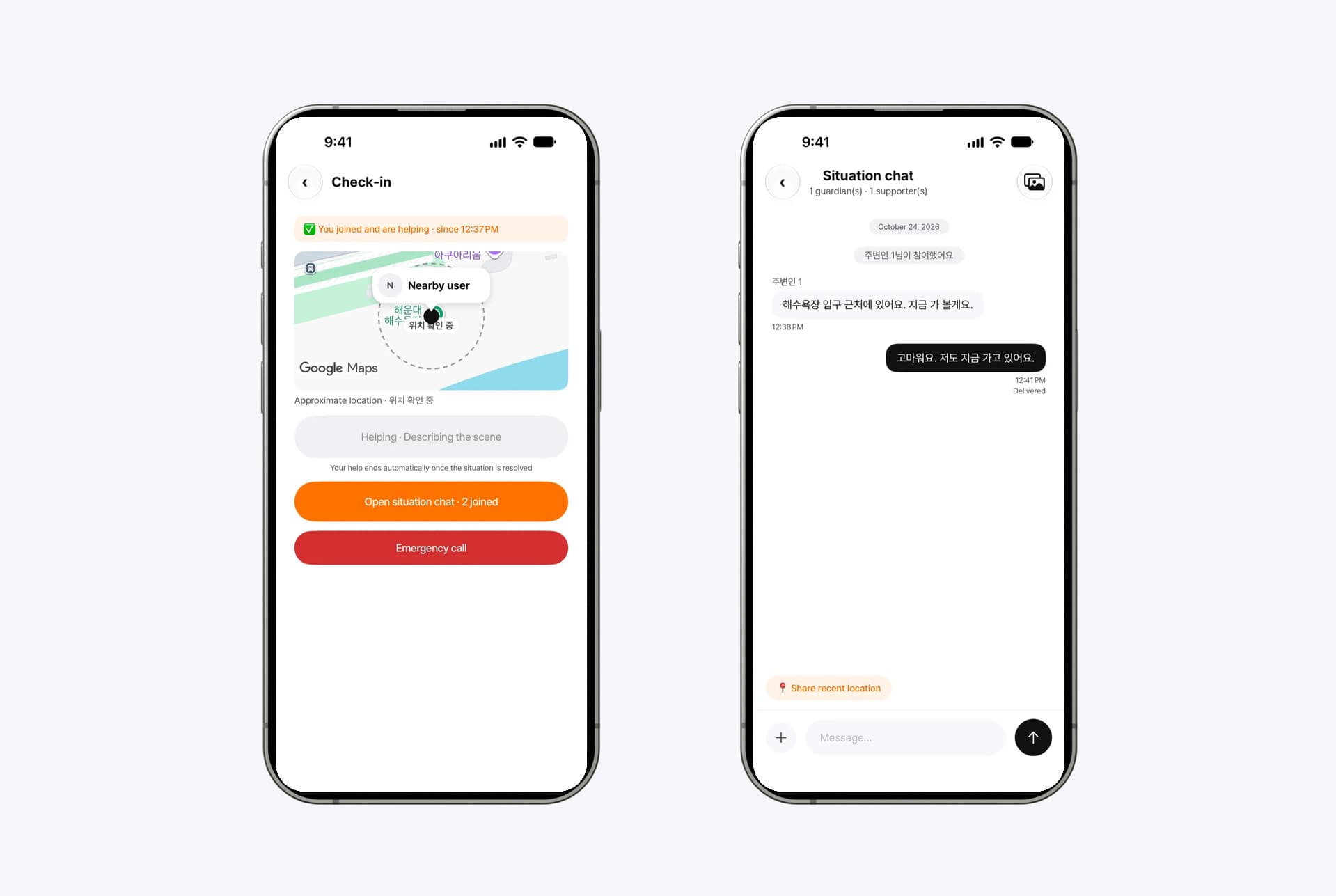
Step 3: Real-time chat
You can share the situation through real-time chat with users who are trying to help.
User A: suspicious man keeps following me!
Guardian: I’m far away. Please help.
Neighbor A: First, come out to the main road. I’m on my way.
Neighbor B: If you turn the corner there, there’s a convenience store. I’ll share my location too.
FAQ
Q. What happens if my smartwatch or smartphone turns off while Heart Rate Protection Mode is running?
If your smartwatch or smartphone turns off while Heart Rate Protection Mode is running, heart rate data suddenly stops being received. Vazoom detects this and determines that it may be an emergency, then sends an alert to your registered alert recipient, or guardian. Vazoom is designed to count on the server whether data is being received properly. Therefore, even if the smartwatch or smartphone turns off, the service operates under the assumption that the device may have been forcibly turned off by someone else. For this reason, if your smartwatch or smartphone battery is running low, it may be better not to use this mode. Even if the device simply shuts down, your guardian may interpret it as an emergency and send a help request to nearby users. Please keep this in mind when using the service.
Q. What happens if my smartphone turns off while Timer Protection Mode is running?
If your smartphone is forcibly turned off by someone else, or shuts down because the battery runs out while Timer Protection Mode is running, you will not be able to enter the password. Since this creates a situation where the password cannot be entered, Vazoom sends an emergency alert to your guardian. Vazoom’s timer countdown is handled on the server, so an emergency alert can still be sent even if the smartphone, or device, is forcibly turned off. This is one of Vazoom’s unique service features. For this reason, if you are in a safe situation but your battery is low, you should not use Timer Protection Mode. Others may think it is a real emergency, which could cause a major disturbance.
Q. Do I have to register an alert recipient, or guardian?
Currently, Timer Protection Mode and Heart Rate Protection Mode use a rule-based algorithm to determine emergency situations through password input for safety confirmation, including incorrect entries or no response. For this reason, users are required to register an alert recipient, or guardian, as a first-step filter to help prevent false emergencies caused by user negligence. But please stay tuned. We are preparing an AI agent that will soon be able to automatically detect and respond to emergency situations. Once it is ready, we will announce it through our notices.
Q. Which smartwatches can be connected to Heart Rate Protection Mode?
Currently, Vazoom can be connected with Apple Watch and Galaxy Watch, as we determined these to be the most widely used smartwatches. We will work to support other smartwatches soon as well. The specific timing for additional smartwatch support will be announced through our notices.
Q. Can Vazoom be used overseas?
봐줌 앱은 처음부터 글로벌 서비스를 하기 위해 구글 지도를 탑재하고 서비스를 하고 있습니다. 2028년까지 20개국에 앱 스토어를 통해 배포를 마칠 예정이고요. 현재 해외에서 사용하면 위급 상황 발생시 한국에 등록된 보호자에게 알람이 갈 수 있습니다.다만 해외 사용자가 주변 사용자로 충분히 가입되기 전까지는 해외에서 해외 사용자의 직접적인 도움을 받는 것은 당분간 어려우니 참고하시어 이용 부탁 드립니다.아래는 해외(일본)에서 직접 테스트한 스크린샷입니다. 1. Emergency alert sent to the guardian 2. Guardian checks the situation 3. User location is confirmed and response begins ※ The map can be zoomed in and out to check the location accurately.
Q. I keep missing the password input for safety confirmation.
For users who often miss the password input, we have set the password input time to 60 seconds, or 1 minute, and send a push notification every 2 seconds asking the user to enter the password. We also send alerts to Apple Watch and Galaxy Watch. If you mainly use Timer Protection Mode, purchasing a smart band may be helpful, as it allows you to receive alerts directly on your wrist.
Q. Is there a reward for helping?
At this stage, most users join the service to help protect one another’s precious family members, so we do not currently provide a separate reward. However, we are preparing a system that will allow users themselves to offer rewards for acts of goodwill.
Q. What kind of help should I provide?
If an emergency occurs nearby, simply checking the situation and reporting it to 112 or 119 on the user’s behalf can be a great help. You can also help by taking photos or videos that may support the victim or the victim’s family in securing evidence. However, because the situation may be dangerous, please do not act alone. We strongly recommend responding together with others. Please always remember that your own safety comes first.
Q. I’m curious about how the reliability score goes up or down.
To be added after receiving the reliability score calculation process.
Q. Why do I need to set areas of interest?
The Vazoom app does not store or track your location in real time. Instead, it uses selective location sharing. Your location is collected only when Timer Protection Mode or Heart Rate Protection Mode is active, and it is shared with your guardians only if an emergency occurs. For this reason, every user can set up to two areas of interest. For most users, these areas are usually around their workplace or home. These are the places they know best. If an emergency occurs in one of these areas, you may receive an alert. When you receive an alert while you are in your area of interest, you can participate and help if you are able to. Most emergencies can be resolved simply through the attention and presence of nearby users. However, because the situation may still be dangerous, please do not respond alone. We strongly recommend responding together with others.
- ‹
- 1
- 2
- ›